Get Design AI: Capture live UI and turn it into usable code
Get Design AI, by Viktor Odainyi, connects live web interfaces to AI coding agents for frontend prototyping workflows. It extracts visual interface fragments from web pages and turns them into code snippets developers can reuse in AI-assisted projects and prototypes. The extension focuses on fast capture, export to common web code formats, and a clipboard-ready workflow for AI tools. Aimed at frontend developers, UI designers, and vibe coders who use AI agents to accelerate interface building.
What can the extension capture from a live page?
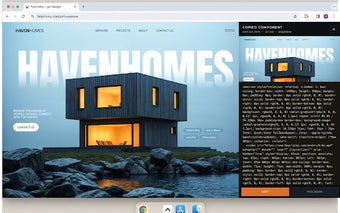
The tool uses a hover selector to let users pick individual interface elements on a live website and copy the element's structure and styles to the clipboard, without requiring access to site source code. This behavior supports workflows that sample real pages directly in the browser, letting developers and designers test extracted fragments on staging or local projects before integrating them into applications.
How does it fit into AI-driven development workflows?
The extension is built for a direct browser-to-AI-agent workflow and is optimized for pasting results into coding assistants. Compatible platforms include:
- Lovable
- v0
- Cursor
- Claude and Gemini (also listed as compatible)
Which code formats and component outputs does it generate?
The extension exports captured elements as HTML, Inline CSS, Tailwind CSS, or React/JSX, and it can package complex UI patterns as reusable JSX components. The source material describes the output as suitable for production use, and the tool is positioned to work well with utility-first frameworks such as Tailwind when users adapt extracted snippets into larger codebases.
Who and which browsers is it designed for?
The extension targets frontend engineers, UI/UX designers, and vibe coders and runs on Google Chrome and other Chromium-based browsers including Brave, Edge, and Vivaldi. The developer is associated with the vibe coding movement and the DESIGN.md ecosystem. The project is described as lightweight and intended to operate across any live website, and it currently serves a small, specialized user base with limited public ratings.
Practical for AI-first prototyping, but in early-stage adoption
Get Design AI is a practical option for developers and designers who depend on AI agents to accelerate interface building, since it ties browser capture to agent workflows. One trade-off is its early-stage footprint: a small, specialized user base and limited public ratings suggest adoption is still emerging. For safer integration, test extractions on non-production pages and review generated snippets before adding them to a codebase.